MASUKAN KATA DI KOTAK BAWAH INI UNTUK MENCARI.. LALU KLIK TOMBOL "SEARCH"

JUAL Berbagai Sistem Operasi dan Software PC/Laptop Murah

Jual murah OS/Software Terbaru atau Lama

Showing posts with label google. Show all posts

July 27, 2023

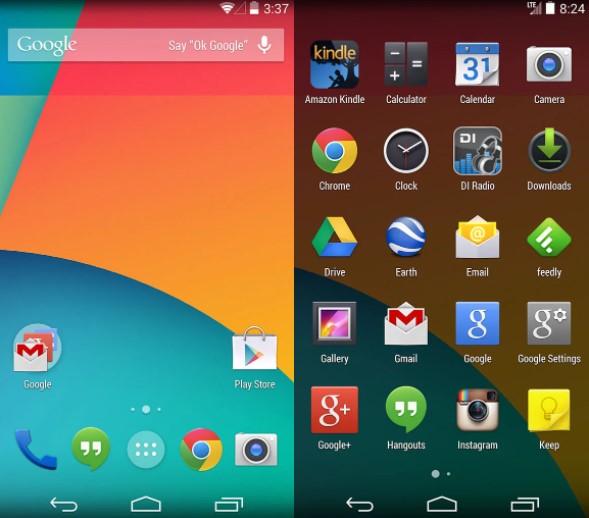
Android KitKat Dihentikan Oleh Google, Beberapa Aplikasi Tak Bisa Dipakai Lagi

Google telah mengumumkan tidak akan lagi mendukung Android 4.4 KitKat dalam rilis terbaru layanan Google Play setelah Agustus 2023. Untuk itu, pengguna ponsel Android yang masih menggunakan sistem operasi Android 4.4 disarankan agar mengganti ponsel mereka dengan yang lebih baru, atau menggunakan ROM khusus agar tetap bisa mengakses aplikasi dan layanan Google terbaru.


Dilansir dari neowin, Senin (25/7/2023), KitKat, yang diluncurkan pada Oktober 2013, akan kehilangan dukungan sebelum ulang tahunnya yang ke-10. Pihak Google mengatakan kurang dari 1% perangkat Android aktif yang masih berjalan di KitKat. Melihat keuntungan yang tidak signifikan dengan jumlah pengguna yang semakin berkurang, tidak lagi memberikan dukungan kepada KitKat menjadi jalan terbaik.


Layanan Play sendiri memungkinkan Google menyediakan fitur baru dan pembaruan rutin untuk aplikasi dan layanannya di perangkat Android secara terpisah dari pembaruan OS. Dengan menghentikan dukungan untuk KitKat, rilis layanan Play mendatang setelah versi 23.30.99 pada Agustus 2023 tidak akan lagi berfungsi pada perangkat yang masih menjalankan Android 4.4.

Terakhir kali Google mengakhiri dukungan untuk Android versi lama pada 2021 untuk Jelly Bean, yang diluncurkan pada tahun 2012. Seperti KitKat, kurang dari 1% perangkat yang masih menggunakan Jelly Bean sebelum dukungan dihentikan.


Perangkat yang saat ini masih menggunakan Andrid 4.4 KitKat memang tergolong jadul, tetapi masih banyak dijumpai di counter handphone bekas. Berikut ini sebagian daftarnya dari brand yang masih eksis di Indonesia:

Samsung:
Samsung Galaxy S4
Samsung Galaxy S4 Zoom
Samsung Galaxy S4 Active
Samsung Galaxy Note 3
Samsung Galaxy S3
Samsung Galaxy Note II
Samsung Galaxy S4 Mini
Samsung Galaxy Tab 3 dan Tab 2

Asus:
Padfone 2
Padfone Infinity
Padfone A80
New Padfone Infinity

LG:
LG G2
LG G Flex
LG Optimus G Pro
LG Optimus G
LG G Pro Lite
LG Optimus L9 II
LG Optimus F7, F6, F3
LG G Pad 8.3


Berbagai fitur dan kecanggihan terus dilakukan guna semakin membuat para pengguna setia android lebih nyaman dan sekaligus melawan kompetitor mereka yakni IOS.
 
Maka kemudian satu demi satu versi android lama yang dirilis mulai dihentikan dukungannya oleh Google guna mengoptimalkan fitur bagi android versi terbaru.
 
Tentunya bagi kamu para pengguna setia Kitkat selama 10 tahun terakhir mau tidak mau harus segera bersiap-siap untuk menggunakan atau membeli android dengan versi terbaru.


Sebab dengan pengumuman ini sudah dipastikan Google akan mulai melakukan penghentian dukungan terhadap seluruh gadget yang menggunakan sistem operasi Android Kitkat,


February 28, 2023

Jutaan Pengguna Windows Jadul Diblokir Untuk Update Google Chrome

Peramban Google Chrome yang sangat populer baru saja menerima peningkatan besar. Ini mencakup sejumlah pembaruan yang ditujukan untuk meningkatkan kecepatan dan efisiensi perangkat lunak tampilan web ini. Chrome versi 110 hadir dengan banyak fitur baru, seperti penjelajahan yang lebih aman dan manajemen kata sandi yang lebih baik. Namun, tambahan yang paling menarik adalah pengenalan mode Penghemat Energi dan Penghemat Memori (Energy Saver dan Memory Saver).


Perubahan ini telah ditambahkan untuk membantu mengurangi konsumsi daya. Misal, Penghemat Memori sekarang dapat menunda tab yang tidak digunakan untuk mengosongkan sebagian RAM yang sangat dibutuhkan. Semua tab tetap terlihat dan dapat dimuat ulang kapan saja. Mereka hanya masuk ke hibernasi saat tidak dilihat dan digunakan.

Jika mengaktifkan Penghemat Energi, Anda dapat memblokir beberapa fitur situs web yang menguras daya, seperti efek visual, animasi, dan video. Ini adalah pembaruan yang sangat berguna yang dapat membantu memperpanjang masa pakai baterai dan membuat penjelajahan web terasa jauh lebih cepat dan lancar.

Sayangnya, siapa pun yang menggunakan sistem operasi Microsoft Windows versi lama akan kehilangan peningkatan ini dan akhirnya dapat meyakinkan beberapa orang untuk meningkatkan PC mereka.

Dilansir Express, Google belum lama ini mengonfirmasi tidak lagi mendukung Windows 8 dan Windows 7. Meskipun pengguna dapat terus menggunakan versi Chrome terbaru, mereka tidak akan mendapatkan pembaruan terbaru apa pun yang diluncurkan oleh Google. Faktanya, versi 109 adalah akhir jika Anda menginstal Windows 8 atau 7 di PC Anda.

“Chrome 109 adalah versi terakhir Chrome yang akan mendukung Windows 7, Windows 8/8.1, Windows Server 2012, dan Windows Server 2012 R2. Chrome 110 (untuk sementara dijadwalkan untuk rilis pada 7 Februari 2023) adalah versi pertama Chrome yang memerlukan Windows 10 atau lebih baru. Anda harus memastikan perangkat Anda menjalankan Windows 10 atau lebih baru untuk terus menerima rilis Chrome mendatang,” kata Google.

Siapa pun yang menginginkan fitur-fitur baru sekarang harus mempertimbangkan untuk beralih ke sistem operasi yang lebih baru, seperti Windows atau Windows 11


references by republika

February 11, 2023

Terlalu Banyak Aturan, Mesin Pencari Google Mulai Ditinggalkan

Belakangan Google dibikin ketar-ketir dengan ChatGPT, platform chatbot berbasis kecerdasan dari OpenAi. ChatGPT disematkan di mesin pencarian milik Microsoft, Bing. Dengan adanya ChatGPT di Bing, Google yang selama ini memonopoli industri mesin pencari bisa terancam.

Selain fitur ChatGPT baru, pengguna bisa mendapatkan beberapa hal lain melalui mesin pencari Bing. Misalnya saja, beranda yang tidak hanya menampilkan foto, tetapi juga dilengkapi infografis yang unik dan bermanfaat. nBerikut ini alasan Google bakal bisa kalah dari Microsoft, dikutip dari PCMag, Jumat (10/2/2023).


Menjawab pertanyaan dengan AI

Mengalahkan Google dengan menambahkan fungsionalitas seperti ChatGPT ke mesin pencari, menjadi salah satu alasan Microsoft bisa lebih unggul dari Google.

Fitur ini muncul untuk semua pengguna, tetapi Anda harus masuk daftar tunggu untuk benar-benar menggunakannya.

Sambil menunggu, Anda bisa melihat AI mengetik jawaban seolah-olah sedang memikirkannya setelah membuka pemilih Obrolan untuk pencarian. Langkah ini akan membuka bilah sisi Obrolan yang mulai mengetik jawaban


Wallpaper baru yang cantik

Di Bing, pengguna akan sering melihat gambar di beranda yang menginspirasi, indah, dan mendidik setiap hari. Jika Anda beruntung, Anda akan melihat video yang lebih interaktif menggantikan foto. Terkadang muncul video seperti air bergerak, lanskap, atau pemandangan langit. Terkadang ada juga opsi untuk mendengar suara yang terkait dengan gambar beranda.

Beranda Bing lebih dari sekadar gambar, ia juga menawarkan berita, cuaca, dan harga saham, serta tautan ke versi online aplikasi Microsoft Office. 


Halaman hasil yang lebih berguna

Selian menampilkan apa yang dicari, beberapa tahun yang lalu, Bing memelopori fitur di mana bisa memperlihatkan jawaban dari perspektif yang berbeda. Jadi jika mengetikan pertanyaan di Bing, seperti "apakah hot yoga baik untuk Anda?" Bing menunjukkan panel pro dan kontra yang bisa menjadi bahan pertimbangan Anda.

Hadiah

Hadiah atau reward bisa menjadi alasan orang pindah menggunakan Bing. Sebab mereka berbagi sebagian keuntungan dengan pengguna dalam bentuk Microsoft Points, yang Anda peroleh dengan mencari, mengikuti kuis berita online, atau bahkan dengan menggunakan browser Edge.

Anda dapat menukarkan poin dengan hadiah mulai dari kartu hadiah Amazon, Starbucks, atau Xbox, undian untuk produk Surface dan Xbox. Juga bisa digunakan untuk donasi ke organisasi seperti Boys and Girls Club of America, Team Rubicon Disaster Response, atau Nature Conservancy.

Untuk waktu yang lama, Google News memiliki keunggulan yang kuat dalam menampilkan berita tren terbaru, tetapi Bing telah meningkatkan kualitasnya di bagian ini.

Navigasi topik yang disediakan jelas dan tepat waktu. Tampilan topik yang sedang tren juga ditampilkan di gambar utama dan ringkasan dengan tautan ke berbagai sumber.

Hasil real time

Jika ada event besar, Bing menyajikan halaman hasil yang ditata dengan jelas yang menunjukkan semua informasi yang relevan.

Hal yang sama berlaku untuk pemilu, penghargaan hiburan seperti Oscar, dan banyak acara olahraga, seperti Super Bowl dan March Madness.

Pencarian video yang lebih unggul

Antarmuka hasil pencarian video di Bing jauh lebih berguna daripada 10 link Google dengan thumbnail.

Mengklik tautan Video di bagian atas halaman utama akan menampilkan eksplorasi konten yang sedang tren, serta umpan hasil personalisasi dan video apa pun yang telah Anda simpan. Namun hasil yang ditampilkan, sumbernya tetap berasal dari YouTube.

Peta

Bing juga punya fitur peta digital. Fiturnya cukup lengkap dengan petunjuk arah, tampilan jalan, lalu lintas, dan pencarian bisnis lokal lengkap dengan peringkat dan foto Yelp. Bing Maps juga memanfaatkan data dari Here Maps, aplikasi peta hebat lainnya.

Office Online

Seperti Google, Microsoft menawarkan aplikasi produktivitas online, termasuk versi Word, Excel, dan PowerPoint yang sangat mirip dengan versi desktop mereka.

Juga ada aplikasi pencatat OneNote dan Sway, pembuat presentasi web sederhana, yang semuanya hanya dengan sekali klik dari beranda Bing.

Perkiraan cuaca

Saat merencanakan perjalanan, Anda psti ingin mengetahui suhu rata-rata dan curah hujan selama bulan yang direncanakan untuk bepergian. Bing menampilkan grafik batang untuk setiap bulan.


May 20, 2020

Download Google Chrome 83 OFFLINE INSTALLER FINAL 2020

Google Chrome 83 is a browser that combines a minimal design with sophisticated technology to make the web faster, safer, and easier. Google Chrome comes with a full range of competitive features, and is among the most standards-compliant and fastest browsers available. Chrome's minimalist interface, fast page-load times, and support for extensions make the browser appealing to the average user as well as to Google fanatics.


Google chrome 83 has garnered a lot of fame with many internet users since its launch in 2008. It has so far received a considerable share in global use among the internet browsers. The product upholds a Google sense of innovation, creativity and provides a simple to use, faster browsing for the user. The latest version comes with tabbed browsing, synchronization and privacy functions.  One can synchronize bookmarks, extensions, browser preference to ease access regardless of the computer in use. With the capability of tabbed browsing, one can duplicate tabs, drag and rearrange the tabs in the browser window. The tabs function singularly hence; in case one of them has a problem, the rest is unaffected. Embedding tabs is available in Google chrome hence a new tab originating from the parent will be next not at the end of the tabs list. Some of the factors that make the browser one of the best include security, compatibility, speed and ease of use.


Speed
  • Chrome is designed to be fast in every possible way: It's quick to start up from your desktop, loads web pages in a snap, and runs complex web applications fast .
Simplicity
  • Chrome's browser window is streamlined, clean and simple.Chrome also includes features that are designed for efficiency and ease of use. For example, you can search and navigate from the same box, and arrange tabs however you wish quickly and easily.
Security
  • Chrome is designed to keep you safer and more secure on the web with built-in malware and phishing protection, autoupdates to make sure the browser is up-to-date with the latest security updates, and more.
And more features
  • Chrome has many useful features built in, including extensions, translation in the browser, themes, and more.

• Sandboxing.  Every tab in Chrome is sandboxed, so that a tab can display contents of a web page and accept user input, but it will not be able to read the user’s desktop or personal files.
Google say they have “taken the existing process boundary and made it into a jail”. There is an exception to this rule; browser plugins such as Adobe Flash Player do not run within the boundaries of the tab jail, and so users will still be vulnerable to cross-browser exploits based on plugins, until plugins have been updated to work with the new Chrome security. Google has also developed a new phishing blacklist, which will be built into Chrome, as well as made available via a separate public API.

• Privacy. Google announces a so-called incognito mode claiming that it “lets you browse the web in complete privacy because it doesn’t record any of your activity”. No features of this, and no implications of the default mode with respect to Google’s database are given.
• Speed. Speed improvements are a primary design goal.

Stability
• Multiprocessing. The Gears team were considering a multithreaded browser (noting that a problem with existing web browser implementations was that they are inherently single-threaded) and Chrome implemented this concept with a multiprocessing architecture. A separate process is allocated to each task (eg tabs, plugins), as is the case with modern operating systems. This prevents tasks from interfering with each other which is good for both security and stability; an attacker successfully gaining access to one application does not give them access to all and failure in one application results in a “Sad Tab” screen of death. This strategy exacts a fixed per-process cost up front but results in less memory bloat overall as fragmentation is confined to each process and no longer results in further memory allocations. To complement this, Chrome will also feature a process manager which will allow the user to see how much memory and CPU each tab is using, as well as kill unresponsive tabs.

User interface
• Features. Chrome has added some commonly used plugin-specific features of other browsers into the default package, such as an Incognito tab mode, where no logs of the user activity are stored, and all cookies from the session are discarded. As a part of Chrome’s javascript virtual machine, pop-up javascript windows will not be shown by default, and will instead appear as a small bar at the bottom of the interface until the user wishes to display or hide the window. Chrome will include support for web applications running  alongside other local applications on the computer. Tabs can be put in a web-app mode, where the omnibar and controls will be hidden with the goal of allowing the user to use the web-app without the browser “in the  way”.

• Rendering Engine. Chrome uses the WebKit rendering engine on advice from the Gears team because it is simple, memory efficient, useful on embedded devices and easy to learn for new developers.

• Tabs. While all of the major tabbed web browsers (e.g. Internet Explorer, Firefox) have been designed with the window as the primary container, Chrome will put tabs first (similar to Opera). The most immediate way this will show is in the user interface: tabs will be at the top of the window, instead of below the controls, as in the other major tabbed browsers. In Chrome, each tab will be an individual process, and each will have its own browser controls and address bar (dubbed omnibox), a design that adds stability to the browser. If one tab fails only one process dies; the browser can still be used as normal with the exception of the dead tab. Chrome will also implement a New Tab Page which shows the nine most visited pages in thumbnails, along with the most searched on sites, most recently bookmarked sites, and most recently closed tabs, upon opening a new tab, similar to Opera’s “Speed Dial” page.


What's New On Google Chrome 83  FINAL ?
The Chrome team is delighted to announce the promotion of Chrome 83 to the stable channel for Windows, Mac and Linux. This will roll out over the coming days/weeks.

Chrome 83.0.4103.61 contains a number of fixes and improvements -- a list of changes is available in the log. Watch out for upcoming Chrome and Chromium blog posts about new features and big efforts delivered in 83


Security Fixes and Rewards
Note: Access to bug details and links may be kept restricted until a majority of users are updated with a fix. We will also retain restrictions if the bug exists in a third party library that other projects similarly depend on, but haven’t yet fixed.

This update includes 38 security fixes. Below, we highlight fixes that were contributed by external researchers. Please see the Chrome Security Page for more information.


[$20000][1073015] High CVE-2020-6465: Use after free in reader mode. Reported by Woojin Oh(@pwn_expoit) of STEALIEN on 2020-04-21
[$15000][1074706] High CVE-2020-6466: Use after free in media. Reported by Zhe Jin from cdsrc of Qihoo 360 on 2020-04-26
[$7500][1068084] High CVE-2020-6467: Use after free in WebRTC. Reported by ZhanJia Song on 2020-04-06
[$7500][1076708] High CVE-2020-6468: Type Confusion in V8. Reported by Chris Salls and Jake Corina of Seaside Security, Chani Jindal of Shellphish on 2020-04-30
[$5000][1067382] High CVE-2020-6469: Insufficient policy enforcement in developer tools. Reported by David Erceg on 2020-04-02
[$5000][1065761] Medium CVE-2020-6470: Insufficient validation of untrusted input in clipboard. Reported by Michał Bentkowski of Securitum on 2020-03-30
[$3000][1059577] Medium CVE-2020-6471: Insufficient policy enforcement in developer tools. Reported by David Erceg on 2020-03-08
[$3000][1064519] Medium CVE-2020-6472: Insufficient policy enforcement in developer tools. Reported by David Erceg on 2020-03-25
[$2000][1049510] Medium CVE-2020-6473: Insufficient policy enforcement in Blink. Reported by Soroush Karami and Panagiotis Ilia on 2020-02-06
[$2000][1059533] Medium CVE-2020-6474: Use after free in Blink. Reported by Zhe Jin from cdsrc of Qihoo 360 on 2020-03-07
[$1000][1020026] Medium CVE-2020-6475: Incorrect security UI in full screen. Reported by Khalil Zhani on 2019-10-31
[$1000][1035315] Medium CVE-2020-6476: Insufficient policy enforcement in tab strip. Reported by Alexandre Le Borgne on 2019-12-18
[$500][946156] Medium CVE-2020-6477: Inappropriate implementation in installer. Reported by RACK911 Labs on 2019-03-26
[$500][1037730] Medium CVE-2020-6478: Inappropriate implementation in full screen. Reported by Khalil Zhani on 2019-12-24
[$500][1041749] Medium CVE-2020-6479: Inappropriate implementation in sharing. Reported by Zhong Zhaochen of andsecurity.cn on 2020-01-14
[$500][1054966] Medium CVE-2020-6480: Insufficient policy enforcement in enterprise. Reported by Marvin Witt on 2020-02-21
[$500][1068531] Medium CVE-2020-6481: Insufficient policy enforcement in URL formatting. Reported by Rayyan Bijoora on 2020-04-07
[$TBD][795595] Medium CVE-2020-6482: Insufficient policy enforcement in developer tools. Reported by Abdulrahman Alqabandi (@qab) on 2017-12-17
[$TBD][966507] Medium CVE-2020-6483: Insufficient policy enforcement in payments. Reported by Jun Kokatsu, Microsoft Browser Vulnerability Research on 2019-05-23
[$N/A][1045787] Medium CVE-2020-6484: Insufficient data validation in ChromeDriver. Reported by Artem Zinenko on 2020-01-26
[$N/A][1047285] Medium CVE-2020-6485: Insufficient data validation in media router. Reported by Sergei Glazunov of Google Project Zero on 2020-01-30
[$TBD][1055524] Medium CVE-2020-6486: Insufficient policy enforcement in navigations. Reported by David Erceg on 2020-02-24
[$500][539938] Low CVE-2020-6487: Insufficient policy enforcement in downloads. Reported by Jun Kokatsu (@shhnjk) on 2015-10-06
[$500][1044277] Low CVE-2020-6488: Insufficient policy enforcement in downloads. Reported by David Erceg on 2020-01-21
[$500][1050756] Low CVE-2020-6489: Inappropriate implementation in developer tools. Reported by @lovasoa (Ophir LOJKINE) on 2020-02-10
[$TBD][1035887] Low CVE-2020-6490: Insufficient data validation in loader. Reported by Twitter on 2019-12-19
[$N/A][1050011] Low CVE-2020-6491: Incorrect security UI in site information. Reported by Sultan Haikal M.A on 2020-02-07

We would also like to thank all security researchers that worked with us during the development cycle to prevent security bugs from ever reaching the stable channel.

As usual, our ongoing internal security work was responsible for a wide range of fixes:
  • [1084009] Various fixes from internal audits, fuzzing and other initiatives


Interested in switching release channels?  Find out how here. If you find a new issue, please let us know by filing a bug. The community help forum is also a great place to reach out for help or learn about common issues.


Thank you,

Srinivas Sista


February 23, 2020

Download Google Chrome 80 OFFLINE INSTALLER FINAL 2020

Google Chrome 80 is a browser that combines a minimal design with sophisticated technology to make the web faster, safer, and easier. Google Chrome comes with a full range of competitive features, and is among the most standards-compliant and fastest browsers available. Chrome's minimalist interface, fast page-load times, and support for extensions make the browser appealing to the average user as well as to Google fanatics.


Google chrome 80 has garnered a lot of fame with many internet users since its launch in 2008. It has so far received a considerable share in global use among the internet browsers. The product upholds a Google sense of innovation, creativity and provides a simple to use, faster browsing for the user. The latest version comes with tabbed browsing, synchronization and privacy functions.  One can synchronize bookmarks, extensions, browser preference to ease access regardless of the computer in use. With the capability of tabbed browsing, one can duplicate tabs, drag and rearrange the tabs in the browser window. The tabs function singularly hence; in case one of them has a problem, the rest is unaffected. Embedding tabs is available in Google chrome hence a new tab originating from the parent will be next not at the end of the tabs list. Some of the factors that make the browser one of the best include security, compatibility, speed and ease of use.


Speed
  • Chrome is designed to be fast in every possible way: It's quick to start up from your desktop, loads web pages in a snap, and runs complex web applications fast .
Simplicity
  • Chrome's browser window is streamlined, clean and simple.Chrome also includes features that are designed for efficiency and ease of use. For example, you can search and navigate from the same box, and arrange tabs however you wish quickly and easily.
Security
  • Chrome is designed to keep you safer and more secure on the web with built-in malware and phishing protection, autoupdates to make sure the browser is up-to-date with the latest security updates, and more.
And more features
  • Chrome has many useful features built in, including extensions, translation in the browser, themes, and more.

• Sandboxing.  Every tab in Chrome is sandboxed, so that a tab can display contents of a web page and accept user input, but it will not be able to read the user’s desktop or personal files.
Google say they have “taken the existing process boundary and made it into a jail”. There is an exception to this rule; browser plugins such as Adobe Flash Player do not run within the boundaries of the tab jail, and so users will still be vulnerable to cross-browser exploits based on plugins, until plugins have been updated to work with the new Chrome security. Google has also developed a new phishing blacklist, which will be built into Chrome, as well as made available via a separate public API.

• Privacy. Google announces a so-called incognito mode claiming that it “lets you browse the web in complete privacy because it doesn’t record any of your activity”. No features of this, and no implications of the default mode with respect to Google’s database are given.
• Speed. Speed improvements are a primary design goal.

Stability
• Multiprocessing. The Gears team were considering a multithreaded browser (noting that a problem with existing web browser implementations was that they are inherently single-threaded) and Chrome implemented this concept with a multiprocessing architecture. A separate process is allocated to each task (eg tabs, plugins), as is the case with modern operating systems. This prevents tasks from interfering with each other which is good for both security and stability; an attacker successfully gaining access to one application does not give them access to all and failure in one application results in a “Sad Tab” screen of death. This strategy exacts a fixed per-process cost up front but results in less memory bloat overall as fragmentation is confined to each process and no longer results in further memory allocations. To complement this, Chrome will also feature a process manager which will allow the user to see how much memory and CPU each tab is using, as well as kill unresponsive tabs.

User interface
• Features. Chrome has added some commonly used plugin-specific features of other browsers into the default package, such as an Incognito tab mode, where no logs of the user activity are stored, and all cookies from the session are discarded. As a part of Chrome’s javascript virtual machine, pop-up javascript windows will not be shown by default, and will instead appear as a small bar at the bottom of the interface until the user wishes to display or hide the window. Chrome will include support for web applications running  alongside other local applications on the computer. Tabs can be put in a web-app mode, where the omnibar and controls will be hidden with the goal of allowing the user to use the web-app without the browser “in the  way”.

• Rendering Engine. Chrome uses the WebKit rendering engine on advice from the Gears team because it is simple, memory efficient, useful on embedded devices and easy to learn for new developers.

• Tabs. While all of the major tabbed web browsers (e.g. Internet Explorer, Firefox) have been designed with the window as the primary container, Chrome will put tabs first (similar to Opera). The most immediate way this will show is in the user interface: tabs will be at the top of the window, instead of below the controls, as in the other major tabbed browsers. In Chrome, each tab will be an individual process, and each will have its own browser controls and address bar (dubbed omnibox), a design that adds stability to the browser. If one tab fails only one process dies; the browser can still be used as normal with the exception of the dead tab. Chrome will also implement a New Tab Page which shows the nine most visited pages in thumbnails, along with the most searched on sites, most recently bookmarked sites, and most recently closed tabs, upon opening a new tab, similar to Opera’s “Speed Dial” page.


What's New On Google Chrome 80  FINAL ?

The stable channel has been updated to 80.0.3987.116 for Windows, Mac, and Linux, which will roll out over the coming days/weeks.
A list of all changes is available in the log. Interested in switching release channels? Find out how. If you find a new issue, please let us know by filing a bug. The community help forum is also a great place to reach out for help or learn about common issues.
Security Fixes and Rewards
Note: Access to bug details and links may be kept restricted until a majority of users are updated with a fix. We will also retain restrictions if the bug exists in a third party library that other projects similarly depend on, but haven’t yet fixed.
This update includes 5 security fixes. Below, we highlight fixes that were contributed by external researchers. Please see the Chrome Security Page for more information.
[N/A][1051017] High CVE-2020-6383: Type confusion in V8. Reported by Sergei Glazunov of Google Project Zero on 2020-02-11
[$7500][1048473] High CVE-2020-6384: Use after free in WebAudio. Reported by David Manouchehri on 2020-02-04
[$5000][1043603] High CVE-2020-6386: Use after free in speech. Reported by Zhe Jin from cdsrc of Qihoo 360 on 2020-01-20
We would also like to thank all security researchers that worked with us during the development cycle to prevent security bugs from ever reaching the stable channel.As usual, our ongoing internal security work was responsible for a wide range of fixes:
  • [1054478] Various fixes from internal audits, fuzzing and other initiatives

Srinivas Sista Google Chrome


Like us on Facebook