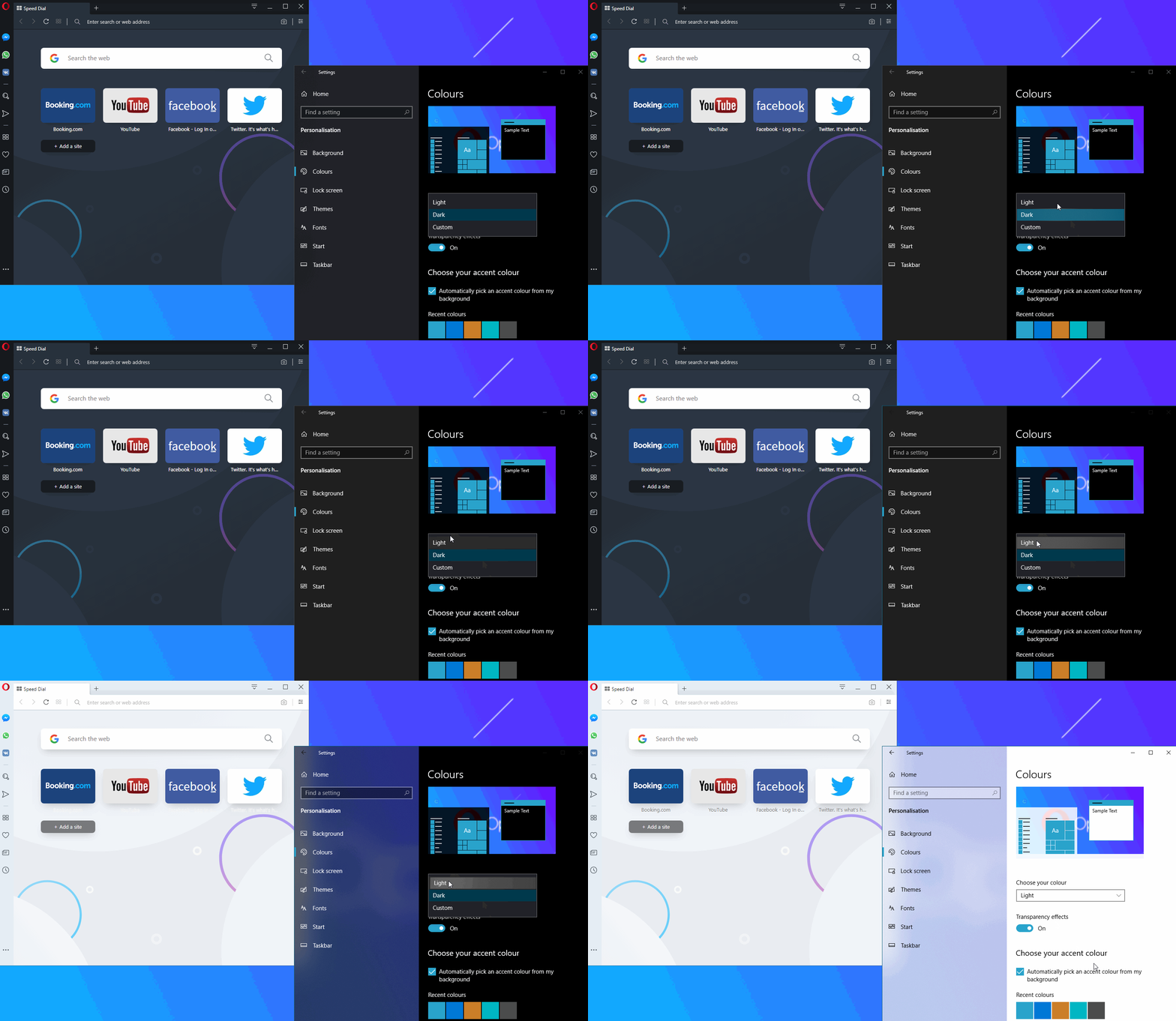
Browser Opera mengumumkan kehadiran mode baru pada browser besutannya yang diberi nama Mode Lucid. Dengan mengaktifkan mode ini, maka para penggunanya bisa menonton video secara online dengan kualitas yang lebih dipertajam dan lebih baik
Mode ini bisa diakses ketika pengguna Opera membuka video secara online di beragam platform, seperti misalnya YouTube, Facebook, atau Twitter. Setelah itu, nanti tombol Lucid Mode ini akan muncul dengan tampilan seperti floating button.
Dan seperti janjinya, Mode Lucid ini akan menambahkan ketajaman dan kejernihan pada video yang tengah ditonton pada Opera. Pihaknya menjanjikan bahwa mode ini bisa dipakai di beragam platform media sosial seperti YouTube, TikTok, Instagram, Facebook, atau Twitter.
CARA MENGAKTIFKAN FITUR LUCID MODE DI BROWSER OPERA
1. Pastikan PC/Laptop/Notebook sudah terinstal Browser Opera Terbaru. Jika belum, silahkan download
2. Jika sudah diinstal, Buka browser Opera. Arahkan pointer Mouse ke sudut Pojok kiri atas > Kik Menu > klik Settings.
3. Ketikan di kotak Pojok kanan atas "Search Settings" , ketikan Lucid Mode
> Klik yang ingin kamu aktifkan fitur Lucid Modenya, Apakah Gambar, Video
Sharpen videos on all sites
Show button on videos
Sharpen images on all sites
4. Tes buka Youtube dan mainkan sebuah Video, Jika gambar menjadi terputus-putus setelah kamu aktifkan fitur Lucid Mode, Kemungkinan Hardware kamu Processor/VGA/RAM ridak mendukung atau speknya kurang. Kmu bisa menonaktifkan kembali fitur Lucid mode di Operanya dengan cara mengklik/menggeser yang seblumnya diaktifkan
Dark Reader adalah ekstensi peramban perawatan mata sumber terbuka.Itu tidak mengirim data pengguna ke mana pun.Dipercaya oleh 5.000.000 pengguna.Dikembangkan sejak tahun 2014.
Sering berjam-jam didepan komputer atau laptop? Hal tersebut bisa membuat mata akan lelah bahkan rusak dalam beberapa tahun kedepan, pandangan akan jadi kabur, berbayang, tidak bisa melihat jarak jauh atau jarak dekat
Apa itu Sindrom Penglihatan Komputer?
Sindrom Penglihatan Komputer (CVS), atau yang biasa disebut sebagai ketegangan mata digital, adalah kondisi yang dapat terjadi ketika Anda menggunakan komputer atau perangkat lain dengan layar digital untuk waktu yang cukup lama. Kondisi ini dapat menyebabkan penglihatan yang kabur atau iritasi mata.
Seseorang yang menatap layar digital meskipun hanya dua jam setiap hari juga dapat mengalami kondisi ini. Riset terbaru juga mengatakan bahwa, diantara 50 hingga 90 persen individu yang memiliki pekerjaan yang melibatkan komputer, mengalami gejala ketegangan mata digital.
Gangguan penglihatan ini disebabkan oleh cahaya terang (atau sinar biru) dari layar yang masuk ke mata Anda karena terus-menerus memfokuskan penglihatan saat membaca sesuatu pada monitor.
Solusinya adalah menggunakan dark Mode pada PC/Laptop, hal tersebut akan membantu mengurangi cahaya yg masuk ke mata.
KOMPATIBEL UNTUK SISTEM OPERASI / OS LINUX, MAC DAN WINDOWS
PENGGUNA FIREFOX
Di pojok kanan atas, klik garis 3 > klik Settings PADA "Language and Appearance Website appearance " pilih "DARK"
Setelah itu Download Plugins Dark mode Firefox KLIK DISINI
Klik Add To Firefox, Tunggu bebebrapa detik/menit tergantung koneksi internet, akan muncul jendela instalasi, Pilih OK
PENGGUNA CHROME
Cara memeriksa apakah Anda dalam Mode gelap atau Mode penyamaran
Buka Chrome.
Di kanan atas, periksa apakah Anda melihat:
Profil Anda Profil: Anda menggunakan Mode gelap.
Mode Penyamaran Samaran: Anda mengakses secara pribadi.
Setelah itu Download Plugins Dark mode Google KLIK DISINI
PENGGUNA OPERA
Di pojok kiir atas, klik Menu > Settings , Di kotak serach Settings ketik tulisan "Dark Mode"
Pada tulisan "Force dark theme on pages" klik tombol hingga berubah menjadi ON
maka tampilan browser akan berubah menjadi Hitam
PENGGUNA EDGE
Di pojok kanan atas, klik lingkaran 3 baris, Klik Settings > Pilih Dark
Setelah itu Download Plugins Dark mode Edge KLIK DISINI
Klik tulisan "GET" > Klik tulisan Add Ekstension
KALAU SUATU SAAT ADA MUNCUL POPUP TAPI TOMBOL CLOSE ATAU TANDA X NYA TIDAK TERLIHAT BISA NONAKTIFKAN DULU SEMENTARA PLUGINSNYA DENGAN CARA
KLIK LOGO DARK READER, LALU KLIK TULISAN DARI ON MENJADI OFF
With the newest release of Opera 62, we have some interesting design updates on top of the changes we introduced in Reborn 3. We’d also like to show you a feature that will help you plan your holidays more easily.
Design updates including improved Dark Mode and support for Windows dark theme
Ever since the launch of Reborn 3 in April, we’ve been hard at work improving our dark theme to make it available throughout the browser. Opera also supports the Windows dark theme. This means you can make Opera darker: we’ve made the authentication dialogs, context menus and bookmarks editing dark. The checkmark icon will now also change colors when hovered. We’ve also changed the color of alert texts to a new shade of red.
With this release, we also thought about those of you who use large HD displays. To make the use of the Speed Dial easier, we have introduced a function in the EasySetup panel that lets you make the tiles larger.
Task completer – Plan your travels with ease
Getting back to the things you find on the Web is not always easy. Where was it? Did someone send me that link? Did I see that website while searching for something else? Where did I save it? We know the pain.
With this release, we are creating the option to connect your browser’s history to your Speed Dial so that you can more easily return to and finish the tasks you’ve started. This should happen seamlessly – without the need for you to dig through your history or locate the tab you started with. This is a concept we first thought of on the Neon project, and now we are introducing the first experimental version of it into our main Opera browser.
We wanted to experiment with Task Completer in a context where retrieving previous search results is most important, such as travel. When we look for flights and book hotels we don’t always make instant decisions. Oftentimes, we want to go back to a specific hotel and show it to friends or loved ones traveling with us before we book. That is why, in this first experimental release of the Task Completer, we are helping you get back to the hotels that you searched for on booking.com. We will present them to you locally, on Opera’s Speed Dial. This is done fully client-side, without any network look-up, and will only appear for active booking.com users who have looked into at least 3 different hotels. You can use the preview feature immediately or hide it for later.
Opera is a web browser developed by Opera Software. Features include tabbed browsing, page zooming, mouse gestures, and an integrated download manager. Its security features include built-in phishing and malware protection and the ability to delete private data such as HTTP cookies. Opera is designed with your life in mind. The day is short and productivity is essential, so let the Opera Web browser help you tackle your 'to do' list.
Reborn 3 (Opera 60) was designed to improve people’s control over their privacy, security, and to give them access to Web 3, the Web of the future
Opera comes with new design
With Reborn 3, we put Web content at center stage. We’ve removed dividing lines between sections so you can browse without borders and unhindered by unnecessary distractions. And, just as no one frame is effective for every picture or in every lighting, we’ve given the browser two distinct themes, light and dark.
The design of each of these themes was inspired by high-key and low-key lighting photography, where the goals are to maximize or minimize the amount of light in a photo while still retaining contrast. Depending on your mood, your setting or the content you are viewing, you are in control of how you frame the Web.
With the light theme, your entire browser, including the sidebar and tab area, is bright and clean. To us, this evokes a feeling of openness and optimism. We designed it to spark productivity and to lift your mood.
The dark theme signifies to us a certain elegance and focus. It turns the browser dark and subdued, almost mysterious. But on a practical note, it’s also soothing for the eyes.
It comes down to what works best for you – we’re giving you a choice to frame your web browsing in a way that works for you.
Opera’s design changes
Our vision of minimalism is such that your browser is more functional for your daily use, not less. That’s why, with this release, we have moved some of the features to make them more accessible without getting in your way.
Tabs have been redesigned to elicit a visceral response; whichever tab you have open, it feels physically open and stays on top of other tabs.
After thorough testing we have also decided to move Easy Setup and snapshot to the access bar, where they are better placed for convenient access.
Opera’s sci-fi short story about the choices we make in our digital lives
Once you access the Easy Setup area, you will also notice two “special edition” themes. They have been inspired by a short, futuristic film we shot to depict the journey we go through our everyday lives to regain control over our digital lives.
To watch and read the story, click the picture above or go to www.opera.com/escape
New place for the snapshot tool
The snapshot tool, which lets you take screenshots of a website, has now been placed next to other web browsing functionalities such as “Send to My Flow” and bookmarks. This means that all the key interactions you can have with a website, such as adding it to bookmarks, sending it to your “Flow” or taking a screenshot, are in one place.
Protect your information with our free and unlimited browser VPN
Opera is the only browser which features a built-in VPN service. This is a feature we have been offering for a while but we now have made it much faster.
A virtual private network, or VPN, replaces your local IP address with a virtual one, making it difficult for websites to determine the location you are browsing from. We consider your location to be your own private information, and if you wish to withhold this while you are browsing, we believe you have the right to do so. Using a VPN also protects you when browsing on a public network from other users sharing this network. Many third-party VPNs have expensive rates, low data limits and are based around unsafe extensions.
Our browser VPN is completely free and unlimited, as well as being a no-log service. Our VPN servers do not log or retain any activity data.
Block out distractions with built- in ad blocker
Web users are finding their browsing increasingly disrupted by ads. Websites have become increasingly aggressive with the quantity and content of their ads. It can be frustrating to visit a site for a particular purpose, only to have your screen filled with content you don’t want in the form of ads.
Opera was the first among major browsers to add a native ad blocker for faster browsing. The built-in ad blocker lets you choose to opt out of this cluttered version of the web.
Opera’s ad blocker is turned off by default when you first download the browser. To activate it,simply open the “Easy Setup” panel and toggle the “Block ads” switch. The browser will start blocking ads on all websites. However, if you want a specific page to run ads, you can make an exception and turn off the ad blocker for that page. You can do that in by clicking the ad blocker icon in the address bar.
Moving from Web 2 to Web 3
As it has since its creation, the Web continues to evolve. The first iteration of the Web allowed users to access information on static websites, but didn’t offer any interactive elements. The current generation of the Web, often referred to as Web 2.0, made the Web into a community, where users not only received information but also shared their own. Social media platforms let people share their lives online; shopping sites let people buy and sell. But people have become aware that these networks, and therefore their information, are controlled by a few select companies. While the Web seemed to be growing, it was in some ways actually consolidating.
Web 3 is an answer to this. Web 3 is an umbrella term for a set of emerging technologies intersecting cryptocurrencies, blockchains and distributed systems that, together, extend the capabilities of the Web we all use today in important and meaningful ways.
It is the decentralized Web, where information is in the hands of the users.
Cryptocurrency and blockchain offer a new level of security for online transactions. A Crypto Wallet functions similarly to a physical wallet in that it not only stores currency, but it houses your identification. It presents a completely secure way for you to identify yourself to websites. Users are able to complete peer-to-peer transactions, bypassing major corporations who previously monopolized these processes. Non-fungible tokens represent entirely unique digital objects that cannot be replicated; you can truly own digital things. Decentralized apps, or dApps, are a possibility for apps to function independent of the device they are accessed on.
Browse Web 3 on your PC, sign transactions with your smartphone
The Web 3 explorer feature in Opera lets you access applications on the Ethereum blockchain also known as dApps.
The Crypto Wallet, which lets you store cryptocurrency but also tokens and collectibles in the Opera computer browser syncs with the Crypto Wallet in the Opera browser for Android. This means wallet keys never leave your smartphone. In practice, whenever you need to identify yourself to a Web 3 website or sign a transaction on the blockchain, you will get a notification on their smartphone. You’ll be able to confirm it in the same way you unlock your system, using, for example, facial recognition or a fingerprint.
In our pursuit of empowering users to improve all aspects of their web experience, we feel this is the most powerful development, truly the beginning of a new era of the Web.
Opera offers users the tools they need to reclaim control
Opera’s built-in VPN, ad blocking and Crypto Wallet make it the only modern browser to put you in complete control over your digital life, while also giving you a glimpse of the future of the Web. In the world we live in today, we feel this couldn’t be of more importance.
We created a short film we titled “Escape” in which a woman travels through a futuristic world in search of regaining control of her digital life. You can watch it here.
The Opera browser features two special edition animated themes inspired by the film. Try them out by going to the Easy Setup section in the top-right corner of the screen.
There are two new features in this build.Opera 58 will warn you before closing an Opera window with multiple tabs open. This means it will prevent you from accidentally losing the data you might have typed in when filling out forms or writing comments, or in situations where you lose all your tabs due to a “slip of the mouse.”
The confirmation dialog we added serves as a warning. If you don’t wish to see this dialog again, simply tick the checkbox titled “Do not show this warning again.”
The warning dialog won’t be shown when closing private windows.
To turn the warning back on, go to Settings > Advanced > User interface.
Further rollout of different news delivery mechanism in Russia
With this build, we continue to roll out an updated news delivery mechanism to our Russian users. We have now integrated Yandex Zen, a smart, personal news recommendation service, into our start page, replacing our previous mechanism. We have introduced it to provide our users in Russia with a better access to more personalized news. What this means for them is that they will get better news, chosen based on their preferences and browsing history. Yandex Zen uses machine-learning technology and automatically adjusts to your news preferences. You can find more information about it here. Yandex Zen has been switched on only in Russia.
Adobe Flash Player 31 runtime lets you effortlessly reach over 1.3 billion people across browsers and OS versions with no install, 11 times more people than the best-selling hardware game console.
Support for mobile devices
Extend the reach of your content to users wherever they are. Flash Player delivers expressive content to personal computers, smartphones, tablets, smartbooks, and netbooks.
Mobile-ready features for unprecedented creative control
Take advantage of native device capabilities, including support for multitouch, gestures, mobile input models, and accelerometer input.
Hardware acceleration
Deliver smooth high definition (HD) quality video with minimal overhead across mobile devices and personal computers using H.264 video decoding and Stage Video.
Expanded options for high-quality media delivery
Discover new ways to deliver rich media experiences with the Flash Media Server Family of products using HTTP Dynamic Streaming; content protection; and improved support for live events, buffer control, and peer-assisted networking.
Adobe Flash Player is the high-performance, lightweight, highly expressive application runtime that provides uncompromised viewing of expressive applications, content, and videos across browsers, mobile phones, devices and operating systems.
Summary
Adobe Flash Player is a browser plug-in and rich Internet application runtime that delivers consistent and engaging user experiences, audio/video playback, and exciting gameplay.
Immersive experiences with Flash video, content and applications with full-screen mode.
Low-bandwidth, high-quality video with advanced compression technology.
High-fidelity text using the advanced text rendering engine.
Real-time dynamic effects with filters for Blur, DropShadow, Glow, Bevel, Gradient Glow, Gradient Bevel, Displacement Map, Convolution, and Color Matrix.
Innovative media compositions with 8-bit video alpha channels.
Blend modes, radial gradient, and stroke enhancements.
Additional image formats: GIF, Progressive JPEG, and PNG.
Opera 54 arrives to the stable build today with News on Speed Dial, a feature which delivers the latest headlines from the countries and languages of your choice, directly to your browser’s start page.
Plus, a new menu page, called Update and Recovery, has been added to help simplify the browser update and recovery processes.
Please continue reading to learn more:
News on Speed Dial
Catching up on the latest global and local news has just become easier. Thanks to News on Speed Dial, fifty news articles will be shown below your regular Speed Dial folders. Clicking on an article will open the story in a new tab. You can read the news in languages of your choosing.
Multiple categories can be selected to filter the content you wish to see on your Speed Dial. Categories include arts, business, entertainment, food, health, lifestyle, living, motoring, news, science, sports, technology and travel. More than 40 country and language sources are available, and you can also select more than one to receive a variety of news content.
Selecting categories, countries and languages can be done from the top menu bar above the news articles in Speed Dial.
For a more personalized news feed, go to the Personal News page that is accessible from the sidebar in Opera’s start page. This news feature, introduced with Opera 39, allows you to customize individual web sources and pages in addition to languages and countries.
For more news content options in Opera, go to Settings (Preferences on Mac).
Update and Recovery section in the menu
Updating and recovering your browser and its settings have been made more visible and easier to access with the new Update and Recovery menu page. To go to this page, click on the O Menu button (for Windows or Linux users) or click Opera in the menu bar (for Mac users).
You can see the current version number of your browser under Update. Click the Check for update button in this menu to have Opera scan for a new version of the browser. If a new version is available, an Update button will appear.
From time to time, Opera may slow down because it is cluttered with too much browsing data. Also, you may have unknowingly changed some settings, which can affect your browsing experience. Resetting your browser may help you fix these issues.
In the past, users had to perform a number of tasks to retain and restore preferences before a browser reset. With a single click of a button, you can start Opera anew while keeping the important stuff.
Click the Recovery… button to choose a reset option:
Keep my data and only reset Opera settings – This will change your search engines to their default (most likely Google), remove pinned tabs, disable extensions and clear temporary data such as cookies. Your bookmarks, history and saved passwords will not be cleared.
Reset all your data and Opera settings – Both the settings in Opera and your browsing data will be reset and cleared, giving you a completely clean Opera.
Opera 54 includes Chromium version 67.0.3396.87.
Review the developmental life cycle of Opera 54 in the changelog.


 Follow @A_BlogWeb