MASUKAN KATA DI KOTAK BAWAH INI UNTUK MENCARI.. LALU KLIK TOMBOL "SEARCH"

JUAL Berbagai Sistem Operasi dan Software PC/Laptop Murah

Jual murah OS/Software Terbaru atau Lama

September 27, 2018

Jual VMware Workstation Pro 15 [MURAH]

Jual/Beli MURAH kaset SOFTWARE CD/DVD/Flashdisk installer VMware Workstation Pro 15  untuk Windows


( Jual VMware Workstation Pro 15)


What's New

The following support is new in Workstation 15 Pro:
  • New Guest operating systems support
    • Windows 10 1803
    • Ubuntu 18.04
    • Fedora 28
    • RHEL 7.5
    • CentOS 7.5
    • Debian 9.5
    • OpenSuse Leap 15.0
    • FreeBSD 11.2
    • ESXi 6.7
  • DirectX 10.1
    DirectX 10.1 is an incremental update over DirectX 10.0. It provides higher visual quality through the support of multi-sample anti-aliasing (MSAA). DirectX 10.1 also supports Shader Model 4.1 and Cubemap Array.
  • Hardware version 16
    • DirectX 10.1 support
    • Graphics memory up to 3GB
  • REST API
    You can use Workstation RESTful API to automate common virtual machine tasks using standard JSON over HTTP or HTTPS. The following virtual machine operations are supported:
    • Virtual machine inventory management
    • Virtual machine power management
    • Virtual machine clone 
    • Networking management
  • High DPI support
    High DPI related features require that the operating system of the host and virtual machine be Windows 10 version 1703 or later.
    • Host level high DPI support - The Workstation interface auto detects the host level DPI change and auto adjusts the layout to meet the new DPI.
    • Guest DPI synch with host - When there is a DPI change on the host side, the guest operating system adjusts its DPI to match the host DPI.
      VMware Tools 10.3.2 is required for this feature.
  • Hosts and Clusters view when you connect to vCenter
    Workstation 15 Pro adds a new Hosts and Clusters view when you connect to remote vSphere. The inventory tree now shows a hierarchical arrangement of objects in two different views: Hosts and Clusters and VMs. You can easily toggle between these two views with a single click.

    This is a Windows host only feature.
  • vSphere 6.7 support
    Workstation 15 Pro provides seamless support for vSphere 6.7. You can connect to a remote ESXi 6.7 host or vCenter Server 6.7 from Workstation 15 Pro to manage the remote the virtual machines running on vSphere. You can also upload a local virtual machine to vSphere 6.7 or download a remote virtual machine running on vSphere 6.7 to the local desktop.

    You can also deploy a VMware VCSA 6.7 (vCenter Server Appliance) OVA package to run on Workstation 15 Pro.
  • USB Auto connect to virtual machine
    USB devices can automatically connect to a powered on virtual machine when you configure Workstation 15 Pro to remember the connection rule.

    This is a Windows host only feature.
  • SSH login to Linux virtual machine
    You can now access Linux virtual machines using SSH provided by Workstation 15 Pro.
    This feature requires that the operating system of the host be Windows 10 version 1803 or later.
  • Enhanced User Experience
    • Stretch guest display
      The stretch guest display feature is enabled for Linux guests and Windows guests earlier than Windows XP. You can use the Keep Aspect Ratio Stretch feature to stretch the virtual machine display while maintaining the user interface aspect ratio or you can use the Free Stretch feature to stretch the virtual machine display to fill the user interface.

      This is a Windows host only feature.
    • Open virtual machine directory
      You can now easily access the virtual machine directory from a Windows host by right-clicking the virtual machine in the Workstation Pro library and selecting Open VM directory.

      Linux Workstation Pro already supports this feature.
  • Linux host Wayland support
    Workstation 15 Pro can now run on a Linux host Wayland desktop. To install Workstation Pro on a Wayland desktop, you must use terminal mode installation.
  • Performance improvements for virtual NVMe storage

CD/DVD RW di PC/LAPTOP rusak atau sudah tidak bagus membaca CD/DVD ?
atau malah gak ada CD/DVD drive nya ?

bisa order dalam bentuk flashdisk..

METODE DAN CARA  TRANSAKSI Pembelian Flashdisk/ CD / DVD:

SEMUA CD / DVD / Flashdisk yang dijual adalah dalam kondisi dan berjalan dengan Baik (Sudah dicoba di Laptop dan Komputer milik saya.

  • BAGI YANG INGIN TANYA-TANYA DULU, Silahkan tulist POST Di facebook.com/agunkzisme 

  • BAGI YANG SERIUS BELI, Silahkan Kirim Inbox/ Pesan (Message) di facebook.com/agunkzisme
    (*klik tombol "Like" terlebih dahulu agar bisa kirim/terbaca di Inbox/Message ke facebook kami)

1. Secepatnya (1x24 jam) Kami akan langsung merespon pesanan atau berbagai macam pertanyaan anda, kecuali kalau saya nya  lagi tidur yaaaa..
(jangan lupa selalu cek notice Facebook kalian).

2. Untuk Pembeli dari Bandung bisa COD (janjian) dengan saya Di depan TIKI CIJAMBE /SB MART/ depan ATM BNI CIJAMBE, Tapi 1 hari sebelum waktu COD. dan transfer dulu uang baru bisa COD. Waktu info lebih lanjut KIRIMKAN WALL DI FACEBOOK KAMI

KHUSUS UNTUK YANG DILUAR KOTA BANDUNG, TRANSAKSI PEMBAYARAN MELALUI TRANSFER REKENING ANTAR BANK.


CARA PEMESANAN:
  • Untuk Yang Diluar Kota (Yang Serius Beli):
    Silhkan Isi Format Pemesanannya, Kirim ke Message Facebook KAMI, silahkan isi data kalian:

Nama Lengap (Nama ASLI):
Alamat Lengkap :
 (isi selengkap-lengkapnya agar memudahkan kurir dan lebih cepat sampai lokasi) 
Kode Pos:
NO HP:
Kaset/flashdisk Yang Dibeli: _________


Cara Pembayaran:
  • Transfer Rekening Bank /Transfer Tunai
  • ATM
  • m-banking/ Mobile Banking
  • SMS Banking
  • Internet Banking
Boleh pakai rekening temen, kakak/adik atau orangtua, yg penting nanti ada bukti transfernya...

JASA EKSPEDISI
  • Pos
  • JNE
  • TIKI
  • GO-JEK (untuk Kota Bandung, pembayaran via transfer. Silahka kamu order Gojeknya dulu, Paket akan diambil/diantar Go-Jek ke alamat tujuan setelah uang masuk rekening). Minimum order pakai Gojek yaitu beli 2 kaset

UNTUK YANG DILUAR KOTA BANDUNG, PEMBAYARAN MELALUI TRANSFER BANK/ATM, DAN PAKET AKAN SEGERA DIKIRIM KALAU UANG SUDAH MASUK KE REKENING KAMI 


kalo ada yg mau ditanyain jangan tinggalin komentar dibawah postingan artikel ini, soalnya gak akan dibales,
kirim aja WALL ke FACEBOOK.com/agunkzisme

Kalo komen/message/inbox gak dibales berarti
  • Lagi tidur
  • Lagi main
  • Koneksi/Jaringan lagi gangguan
  • Lagi galau :P
  • Lagi mati listrik
  • Message kalian ada dipaling bawah
1 x 24 jam pasti dibales jangan kuatir, Uang masuk rekening, orderan akan segera diproses.

Keuntungan beli disini
  • TIDAK PERLU NUNGGU LAMA. Paket akan dikirim maksimal 1 hari setelah uang masuk ke rekening , tergantung uang kalian masuknya ke rekening kapan.
  • Nomer resi akan diberikan ke inbox facebook/email agar privasi data kalian terjamin
  • Petunjuk instalasi sudah disertakan didalam kaset, tidak bisa atau ada kendala nanti kami bantu
  • Paket pasti sampai, kami sudah berpengalaman kirim-kirim paket  ke seluruh pelosok Indonesia dari Sabang sampai Merauke, bahkan ke pelosok desa, jangan kuatir paket hilang, rusak.
  • Ongkos kirim sudah termasuk biaya asuransi barang (biaya administrasi, pxking, bantuan bertanya, kesulitan instalasi, dll). Untuk lokasi diluar pulau lebih baik ambil minimal 2 kaset agar tidak teralu rugi di ongkos kirimnya.
  • Packing paket aman, rapih jadi gak perlu malu kalau lagi nerima paket. 
  • Kesulitan instalasi ? troubleshoot ?, ada masalah saat instal? bisa tanya ke facebook, nanti kami bantu. Kami bukan orang awam di sistem komputer Windows, Linux atau Apple Mac. Akan berguna bagi kalian yang awam dalam penggunaan komputer.
  • 1 Paket bisa muat untuk pembelian 20 kaset lainnya.
  • Paket gak sampai ?, Tidak seperti seller lainnya yg lepas tanggung jawab , kamu gk perlu ribet hubungin sana-sini, Apalagi malah debat sama admin jasa ekspedisnya yg buang-buang energi+pikiran. Kami yg akan tanggung jawab kalau paket kalian tidak sampai, kami bisa tau detail lokasi paket kamu sedang ada dimana.
  • Petunjuk instalasi sudah disertakan didalam kaset, jika kesulitan install bisa kami bantu..


NO TIPU MENIPU GAN/SIS 

DARI PADA KALIAN BELI DI ORANG LAIN YANG GAK JELAS, GAK NGERTI KOMPUTER, BISA BERAKIBAT KETIPU.. ATAU PROGRAM BERISI VIRUS KOMPUTER
KAMI TIDAK JUALAN DI MARKETPLACE/SITUS  JUAL BELI ONLINE TERKENAL, 

SEHINGGA DATA PRIBADIMU AKAN AMAN, DAN REVIEW ATAS NAMA KAMU MU TIDAK AKAN MUNCUL DISANA SEBAGAI PRIVASI DATA & KEAMANAN DATA
ATAU DOWNLOAD SENDIRI DI INTERNET YANG BISA BERAKIBAT PC/LAPTOP KALIAN ERROR ATAU BAHKAN SEMUA FILE penting RUSAK/HILANG KENA VIRUS.. 
Apalagi virus varian Ransomware yang lagi terkenal

ANE CUMA CARI TAMBAHAN AJA BIAR INTERNET TETEP KENCENG & BIAR BISA TETEP  NGE-BLOG  

DAN AGAR BISA TERUS MENYAMPAIKAN SESUATU SERTA ILMU YG BERMANFAAT DI TIAP POSTINGAN BLOGNYA,. ANGGAP AJA KALIAN BERDONASI UNTUK BLOG INI  

Selama postingan ini masih ada
artinya flashdisk/ kasetnya masih ada..

Kalo pingin beli/order driver, cari atau request software lainnya
silahkan Tanya / tinggalkan WALL di 
FACEBOOK Messenger http://m.me/agunkzisme

WHATSAPP: ( Pastikan Aplikasi WhatsApp Sudah terinstall )
https://api.whatsapp.com/send?phone=62895332273663

Download Opera 56 OFFLINE INSTALLER Windows 7, 8, 8.1 Windows 10, MAC, Linux

We are happy to introduce you to our brand new Opera 56. We have prepared some features that will let you multitask more easily and customize your browsing experience to make it even better. Opera 56 is the best browser for multitaskers and might just be the ideal one to suit your needs.

Volume control for the improved video pop out player makes Opera 56 perfect for balancing work with entertainment. In addition, we have added a page zoom indicator in the address and search bar and have tidied up the settings and About Opera pages. New options in settings for the scroll to the top of the page feature and sponsored content are available, too. Finally, Windows and Linux users have a quicker way to report any bugs or issues in Opera.
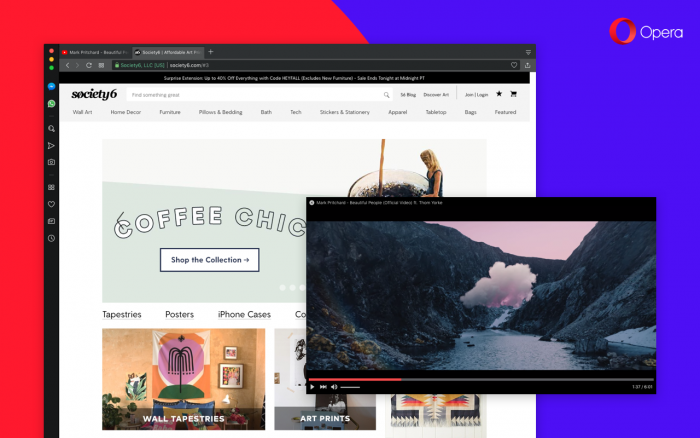
Opera 56 with improved video pop out with volume control
Stream videos on top of your work and adjust the volume directly in the window
Back to work or university after the summer holidays means you might be opening more and more work-related tabs. But work isn’t everything; many of you like to stay entertained while working on a presentation or answering emails. That’s where our video pop out function comes in.  
Many of you are already be familiar with it. Video pop out, a feature we introduced back in 2016, lets you watch a video, for example on YouTube or Vimeo, in a separate window, “popped out” from the website you are streaming it from. This means you can keep browsing or working on a report while not missing on a single frame of the action from your favorite video. Unlike for other browsers, in Opera this feature works with a single click and on most websites containing videos.
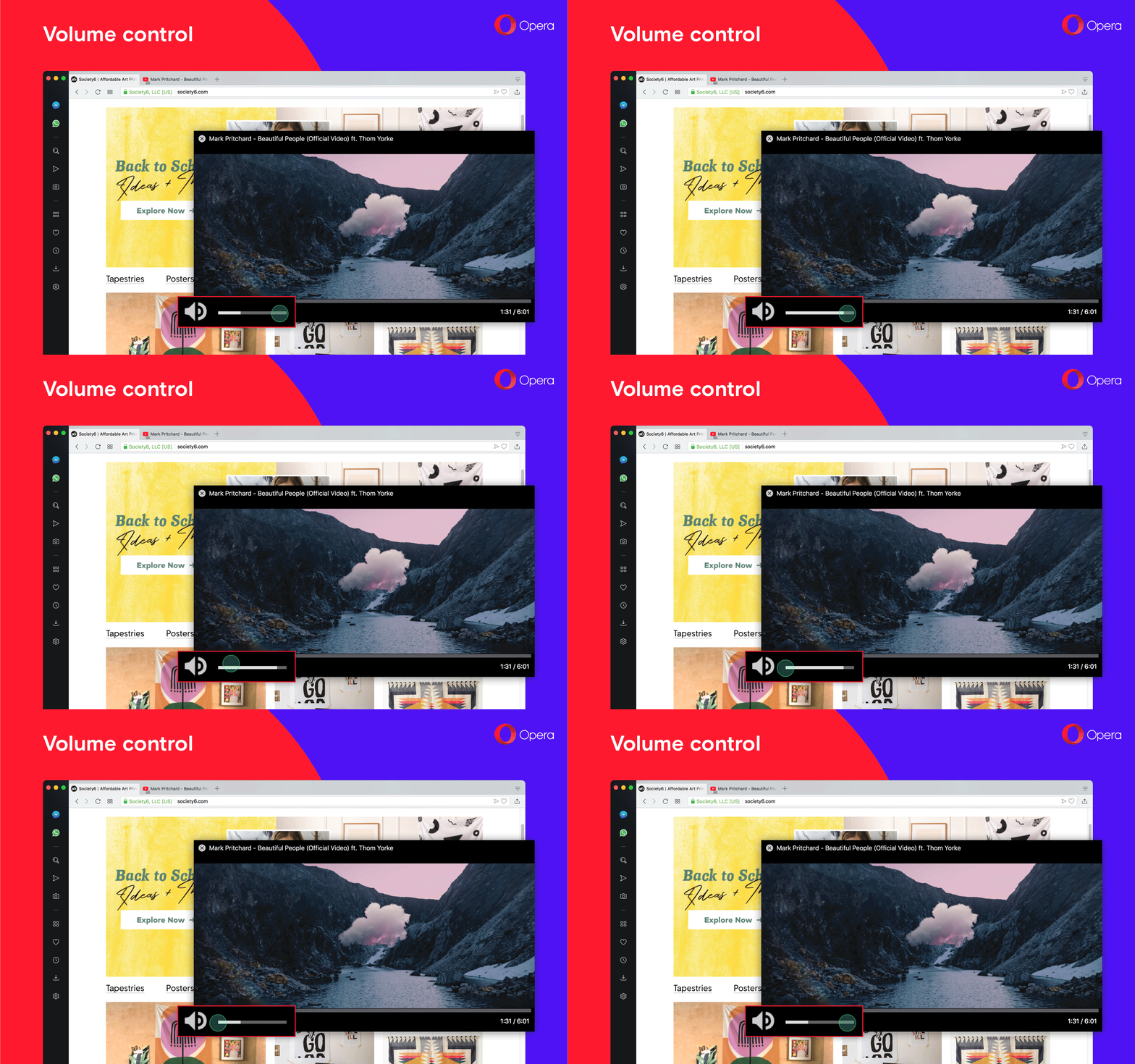
With this version of Opera, we have added an important feature for video pop out: volume control. We’ve made it easier for you to mute or adjust the volume of your videos. A benefit of this is you no longer have to find the tab playing the video to do it. You can now adjust the volume from the mini video window you’re watching.
Volume control is found at the bottom of the video pop out player. Click the speaker icon to mute or unmute your video, and click along the volume slider to adjust the volume as needed.
Remember that you can quickly return to the tab hosting the video without having to find and click on the tab itself. Hover your mouse over the title of the video in the pop out window and click Back to Tab.
To initiate video pop out, start a video from YouTube or Vimeo (or just about from any site) and click the pop out icon at the top-center of the video. A small window will appear. This window can be moved and adjusted as you please.
Scroll to the top of a page by clicking the active tab
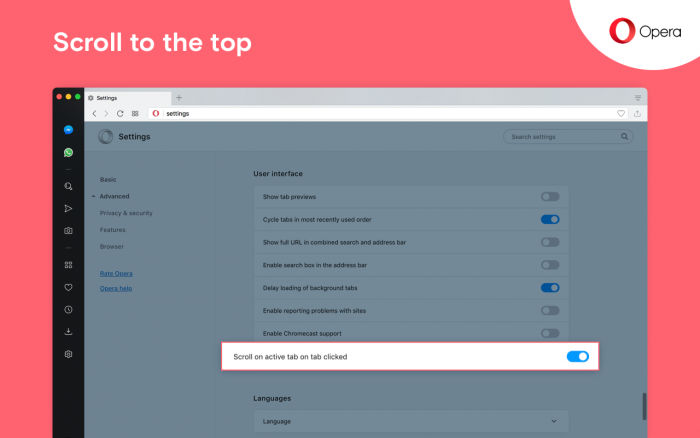
Some time ago, we introduced the scroll to the top of the page feature which allows you to instantly scroll to the top of a web page by clicking the active tab. Clicking the tab again will bring you back to where you were on the page.
Opera 56 - scroll to the top feature
Many of you requested that we let you switch this feature on or off. Today, we’ve added this option to the browser settings page. To access it, simply go to Settings > Advanced > Browser > User interface and click on “Scroll to the top of page by clicking the active tab.”
New zoom level indicator
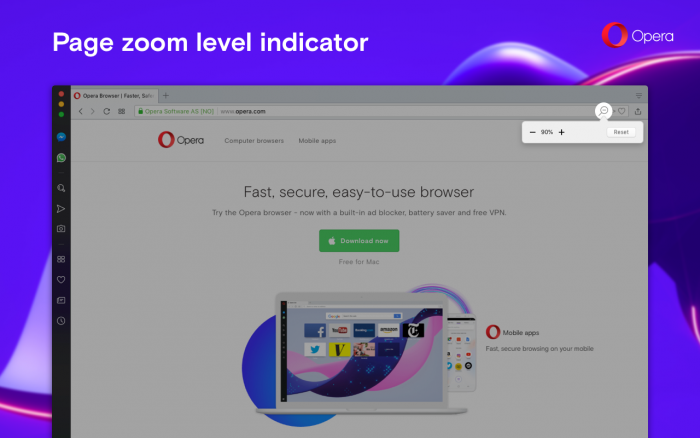
You will find the page zoom level indicator in the combined address and search bar. If you change the zoom level for a particular website, you will see a magnifying glass pop-up informing you about it. You can then change the zoom level by clicking the +/- buttons in the pop-up. If you have set page zoom level to default for all pages, the zoom indicator will not appear in the address bar until you change the zoom level on one of the pages.
Zoom level indicator
You can adjust the page zoom level for all web pages at once by going to Settings > Basic > Appearance > Page zoom.
If you have adjusted the zoom level for an individual website, go to Settings > Advanced > Privacy and security > Content settings > Zoom levels to edit your page zoom preferences.
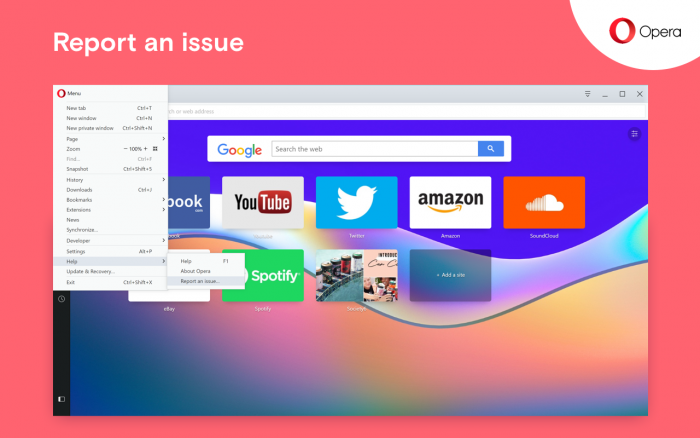
Easier bug reporting
We are always happy to get your input, especially on the elements we can improve on. That’s why we have just made it easier for Windows and Linux users to report any issues that might arise. To do so, should there be a need, simply click the O Menu button and go to Help to find the Report an issue… section. Click on it to get redirected to Opera’s bug report wizard. We’ll take it from there.
Opera 56 bug or issue reporting
Mac users can find Report an issue… by clicking Help in the toolbar.
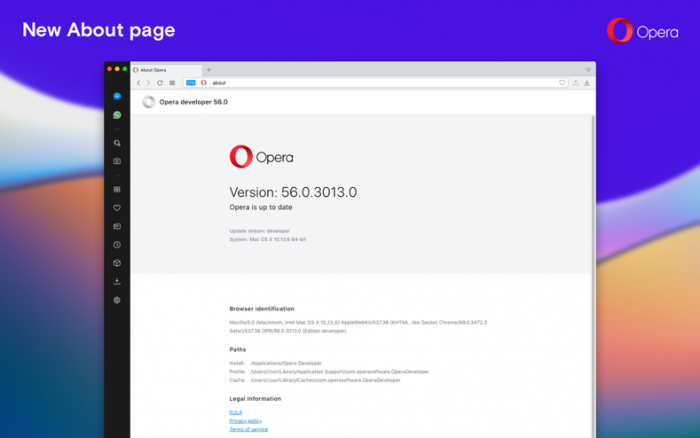
Nicer About page
Our About page provides useful information about your current version of Opera as well as system information and installation, profile and cache paths. We have now redesigned it for your convenience.
Nicer about page
Legal information, including our End User License Agreement and an updated Privacy Statement and Terms of Service, is provided at the bottom of the page.
If you wish to check for an available update to your Opera browser, go to Update and Recovery… in the O Menu for Windows and Linux and Opera in the toolbar for Mac.
Configure sponsored content in the bookmarks bar
In order to provide you with a great, free product, we occasionally suggest sponsored content as Speed Dials or bookmarks. You can now toggle this feature off in the Advanced section of the settings page. Before you do so, please consider that, as a product delivered to you free of charge, you support Opera by keeping sponsored content switched on.
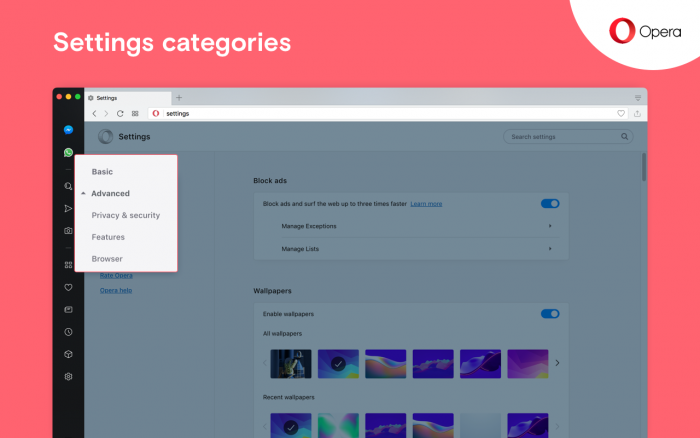
Categories in Settings page
Today, Opera 56 has tidied up the settings page into four sections: Basic, Privacy and security, Features and Browser. We hope this new organization will help you more easily navigate around Opera’s settings page.
Basic includes options for blocking ads, wallpapers, appearances, the sidebar, synchronization, search engines, default browser choices and on startup options.
Privacy and security, Features and Browser are nested in the Advanced section. You can click Advanced in the left sidebar of the settings page to reveal these three remaining sections.
Privacy and security includes preferences for privacy and security and webRTC.
Features includes options for Opera’s VPN, battery saver, Instant Search, My Flow, search pop-up, video pop out, personal news and Opera Turbo.
Finally, Browser includes options for the start page, the user interface, languages, downloads, system, shortcuts and for reset settings.

We hope you enjoy Opera 56. Happy browsing!

The changelog is here.


September 26, 2018

Hacker Impor Diduga Akan Gabung Salah Satu Capres Pilpres 2019

Hacker asal Rusia diduga telah datang ke Indonesia dan melakukan komunikasi dengan salah satu paslon yang akan bertarung di Pilpres 2019.  Pengamat Intelijen, Nuruddin Lazuardi kepada Tribun di Jakarta, Senin (24/9/2018) membenarkan informasi tersebut. Dikabarkan, hacker tersebut telah melakukan komunikasi dengan beberapa petinggi partai politik.


“Iya saya sudah tahu soal itu. Ada pembicaraan antara mereka dengan beberapa politisi. Tim ini sudah ada sejak lama dan itu hal yang biasa saja,” kata Nuruddin.


Hacker tersebut nantinya akan bertugas di media sosial Facebook, Twitter dan Media Online untuk membantu salah satu pasangan calon.


“Mereka akan mengandalkan teknologi yang dimiliki untuk pilpres 2019 ini. Mereka main di Facebook dan Twitter khususnya. Kalau Instagram saya pikir tidak,” tambahnya.


Caranya adalah dengan cara memberangus konten negatif yang menyudutkan pasangan calon yang mengontrak mereka, terutama seputar isu yang viral.


“Mainnya di viral. Kalau ada konten yang menyudutkan, biasanya oleh mereka di “cut” langsung. Kalau sudah viral, nanti kan jadi berita juga di media mainstream,” tambahnya.


Sementara itu, Wakil Direktur Informasi dan Teknologi Badan Pemenangan Nasional Prabowo-Sandiaga Uno, Vasco Ruseimy, membantah adanya peran agen yang menaungi hacker asal Rusia itu. Menurutnya, tidak ada akses kubu mereka ke peretas asal Rusia tersebut. Terlebih, pasangan nomor urut 02 sudah merasa cukup dengan adanya bantuan dari relawan yang bergerak selama ini di media sosial.


"Enggak lah. Kita cukup dengan relawan saja. Lagian, enggak ada akses ke mereka," ucapnya.


Sedangkan Wakil Sekretaris Tim Kampanye Nasional Jokowi-Ma'ruf, Raja Juli Antoni mengatakan bahwa pihaknya masih percaya dengan kemampuan anak bangsa. Dia menegaskan bahwa pihaknya tidak membutuhkan konsultan dari luar negeri.


"Tidak lah. Kami masih percaya dengan anak bangsa. Tidak perlu konsultan politik dari luar negeri," katanya.

September 24, 2018

Diretas, Perusahaan Penukaran Uang Digital Rugi Triliyunan Rupiah

Perusahaan startup penukaran cryptocurrency, Tech Bureau Corp, di Jepang telah diretas. Akibatnya, uang digital senilai 6 miliar yen, setara Rp792 triliun, raib dicuri. Seperti diwartakan laman Business Standard, kabar buruk itu disiarkan pada Kamis, 20 September 2018. Tech Bureau Corp mengatakan dalam sebuah pernyataan, pada 14 September, penyusup digital dari luar negeri telah membongkar sistem keamanannya, dan itu terjadi selama dua jam.

Nahasnya, peretasan itu baru terdeteksi pada Senin lalu, dan kerusakan diketahui sampai hari Selasa esoknya. 67 persen komponen yang dicuri adalah aset milik klien, sementara sisanya dana dari perusahaan pertukaran mata uang cryptocurrency yang terintegrasi dengan Tech Bureau Corp, Zaif.

Pencurian memengaruhi tiga cryptocurrency, tetapi 89 persen di antaranya dalam bitcoin (BTC), sedangkan sisanya pada mata uang virtual MonaCoin (MONA) dan Bitcoin Cash (BCH), dalam jumlah yang belum dihitung secara akurat, karena penyelidikan masih berlangsung.
Perusahaan mengatakan bahwa server sedang ditinjau secara menyeluruh untuk mencegah kerusakan lebih lanjut. Pihaknya telah meminta bantuan keuangan dari salah satu anak perusahaan untuk menutupi kerugian yang ditimbulkan.

Kebobolan serupa juga pernah dialami operator Jepang Coincheck pada Januari. Mereka mengaku sistemnya diretas dan sebanyak $534, setara Rp8 triliun juta berhasil dicuri. Insiden-insiden ini memaksa pihak berwenang Jepang untuk memperketat kontrol di pasar mata uang digital.

references by viva

Jual Software Easy-PC PCB [MURAH]

Jual/Beli MURAH kaset SOFTWARE CD/DVD/Flashdisk installer Easy-PC PCB  untuk Windows


( Jual Easy-PC PCB)


CD/DVD RW di PC/LAPTOP rusak atau sudah tidak bagus membaca CD/DVD ?
atau malah gak ada CD/DVD drive nya ?

bisa order dalam bentuk flashdisk..

METODE DAN CARA  TRANSAKSI Pembelian Flashdisk/ CD / DVD:

SEMUA CD / DVD / Flashdisk yang dijual adalah dalam kondisi dan berjalan dengan Baik (Sudah dicoba di Laptop dan Komputer milik saya.

  • BAGI YANG INGIN TANYA-TANYA DULU, Silahkan tulist POST Di facebook.com/agunkzisme 

  • BAGI YANG SERIUS BELI, Silahkan Kirim Inbox/ Pesan (Message) di facebook.com/agunkzisme
    (*klik tombol "Like" terlebih dahulu agar bisa kirim/terbaca di Inbox/Message ke facebook kami)

1. Secepatnya (1x24 jam) Kami akan langsung merespon pesanan atau berbagai macam pertanyaan anda, kecuali kalau saya nya  lagi tidur yaaaa..
(jangan lupa selalu cek notice Facebook kalian).

2. Untuk Pembeli dari Bandung bisa COD (janjian) dengan saya Di depan TIKI CIJAMBE /SB MART/ depan ATM BNI CIJAMBE, Tapi 1 hari sebelum waktu COD. dan transfer dulu uang baru bisa COD. Waktu info lebih lanjut KIRIMKAN WALL DI FACEBOOK KAMI

KHUSUS UNTUK YANG DILUAR KOTA BANDUNG, TRANSAKSI PEMBAYARAN MELALUI TRANSFER REKENING ANTAR BANK.


CARA PEMESANAN:
  • Untuk Yang Diluar Kota (Yang Serius Beli):
    Silhkan Isi Format Pemesanannya, Kirim ke Message Facebook KAMI, silahkan isi data kalian:

Nama Lengap (Nama ASLI):
Alamat Lengkap :
 (isi selengkap-lengkapnya agar memudahkan kurir dan lebih cepat sampai lokasi) 
Kode Pos:
NO HP:
Kaset/flashdisk Yang Dibeli: _________


Cara Pembayaran:
  • Transfer Rekening Bank /Transfer Tunai
  • ATM
  • m-banking/ Mobile Banking
  • SMS Banking
  • Internet Banking
Boleh pakai rekening temen, kakak/adik atau orangtua, yg penting nanti ada bukti transfernya...

JASA EKSPEDISI
  • Pos
  • JNE
  • TIKI
  • GO-JEK (untuk Kota Bandung, pembayaran via transfer. Silahka kamu order Gojeknya dulu, Paket akan diambil/diantar Go-Jek ke alamat tujuan setelah uang masuk rekening). Minimum order pakai Gojek yaitu beli 2 kaset

UNTUK YANG DILUAR KOTA BANDUNG, PEMBAYARAN MELALUI TRANSFER BANK/ATM, DAN PAKET AKAN SEGERA DIKIRIM KALAU UANG SUDAH MASUK KE REKENING KAMI 


kalo ada yg mau ditanyain jangan tinggalin komentar dibawah postingan artikel ini, soalnya gak akan dibales,
kirim aja WALL ke FACEBOOK.com/agunkzisme

Kalo komen/message/inbox gak dibales berarti
  • Lagi tidur
  • Lagi main
  • Koneksi/Jaringan lagi gangguan
  • Lagi galau :P
  • Lagi mati listrik
  • Message kalian ada dipaling bawah
1 x 24 jam pasti dibales jangan kuatir, Uang masuk rekening, orderan akan segera diproses.

Keuntungan beli disini
  • TIDAK PERLU NUNGGU LAMA. Paket akan dikirim maksimal 1 hari setelah uang masuk ke rekening , tergantung uang kalian masuknya ke rekening kapan.
  • Nomer resi akan diberikan ke inbox facebook/email agar privasi data kalian terjamin
  • Petunjuk instalasi sudah disertakan didalam kaset, tidak bisa atau ada kendala nanti kami bantu
  • Paket pasti sampai, kami sudah berpengalaman kirim-kirim paket  ke seluruh pelosok Indonesia dari Sabang sampai Merauke, bahkan ke pelosok desa, jangan kuatir paket hilang, rusak.
  • Ongkos kirim sudah termasuk biaya asuransi barang (biaya administrasi, pxking, bantuan bertanya, kesulitan instalasi, dll). Untuk lokasi diluar pulau lebih baik ambil minimal 2 kaset agar tidak teralu rugi di ongkos kirimnya.
  • Packing paket aman, rapih jadi gak perlu malu kalau lagi nerima paket. 
  • Kesulitan instalasi ? troubleshoot ?, ada masalah saat instal? bisa tanya ke facebook, nanti kami bantu. Kami bukan orang awam di sistem komputer Windows, Linux atau Apple Mac. Akan berguna bagi kalian yang awam dalam penggunaan komputer.
  • 1 Paket bisa muat untuk pembelian 20 kaset lainnya.
  • Paket gak sampai ?, Tidak seperti seller lainnya yg lepas tanggung jawab , kamu gk perlu ribet hubungin sana-sini, Apalagi malah debat sama admin jasa ekspedisnya yg buang-buang energi+pikiran. Kami yg akan tanggung jawab kalau paket kalian tidak sampai, kami bisa tau detail lokasi paket kamu sedang ada dimana.
  • Petunjuk instalasi sudah disertakan didalam kaset, jika kesulitan install bisa kami bantu..


NO TIPU MENIPU GAN/SIS 

DARI PADA KALIAN BELI DI ORANG LAIN YANG GAK JELAS, GAK NGERTI KOMPUTER, BISA BERAKIBAT KETIPU.. ATAU PROGRAM BERISI VIRUS KOMPUTER
KAMI TIDAK JUALAN DI MARKETPLACE/SITUS  JUAL BELI ONLINE TERKENAL, 

SEHINGGA DATA PRIBADIMU AKAN AMAN, DAN REVIEW ATAS NAMA KAMU MU TIDAK AKAN MUNCUL DISANA SEBAGAI PRIVASI DATA & KEAMANAN DATA
ATAU DOWNLOAD SENDIRI DI INTERNET YANG BISA BERAKIBAT PC/LAPTOP KALIAN ERROR ATAU BAHKAN SEMUA FILE penting RUSAK/HILANG KENA VIRUS.. 
Apalagi virus varian Ransomware yang lagi terkenal

ANE CUMA CARI TAMBAHAN AJA BIAR INTERNET TETEP KENCENG & BIAR BISA TETEP  NGE-BLOG  

DAN AGAR BISA TERUS MENYAMPAIKAN SESUATU SERTA ILMU YG BERMANFAAT DI TIAP POSTINGAN BLOGNYA,. ANGGAP AJA KALIAN BERDONASI UNTUK BLOG INI  

Selama postingan ini masih ada
artinya flashdisk/ kasetnya masih ada..

Kalo pingin beli/order driver, cari atau request software lainnya
silahkan Tanya / tinggalkan WALL di 
FACEBOOK Messenger http://m.me/agunkzisme

WHATSAPP: ( Pastikan Aplikasi WhatsApp Sudah terinstall )
https://api.whatsapp.com/send?phone=62895332273663

 
Like us on Facebook